Note taker for product managers
Hear the customer. Not your keyboard.
Customer interviews, planning, stakeholder syncs. Dalm keeps the record — the words, the name, the minute.
A note taker for product managers records the meetings where the product gets decided — planning, design reviews, demos, retros — so you can run the conversation instead of writing it down, and keeps the decisions findable afterwards. Dalm, a Mac app, records without joining the call. It recognises speech on your Mac and sends no audio anywhere; the transcript goes to our servers automatically, where a language model run by a third party reads it to write the summary and any document you ask for. Decisions and tasks from your meetings gather in two lists. There is a Free plan.
What a product manager needs to keep from a meeting
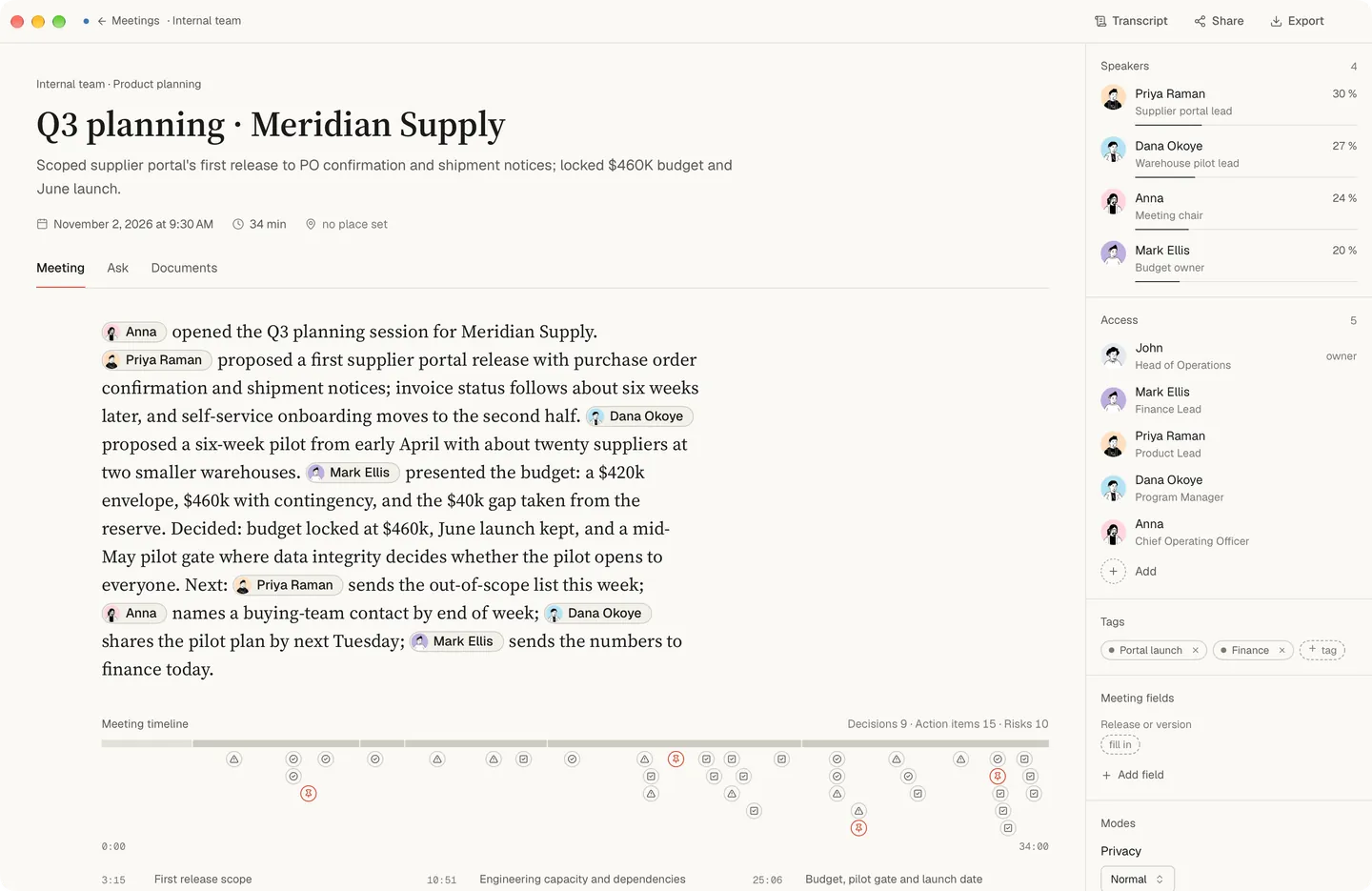
Most product decisions are made out loud: in planning, in a design review, in a demo where someone says “ship it” or “not like this”. A month later the question is rarely what the meeting was about. It is why the scope changed, who agreed to it, and what was left open. So what you need from a meeting is the decision in the words it was made in, the owner and the date wherever someone said them, the questions nobody closed, and a way to find all of it again without asking the team to remember.
Calls, rooms and a recording someone else made
On a call, Dalm records your microphone and the sound of the other apps on your Mac, so no bot joins and nobody has to let one in. When Zoom, Microsoft Teams, Slack or FaceTime starts using the microphone, the app offers to record; Google Meet in a browser is recognised while a calendar event with the call link is on. In a room — planning round a table, a design review on a shared screen — it records through your Mac’s microphone. If a colleague recorded a meeting you missed, you can bring the audio or video file in to be transcribed. Step by step, recording is covered for Zoom, Microsoft Teams and Google Meet.
Planning, design reviews, demos and retros: what you get after each
Dalm works out from the conversation what kind of meeting it was and shows it at the top of the meeting. You cannot pick or change it; when it is unsure, it files the meeting as a general one. These are kinds of product meeting it can recognise, and what you get after each:
| The meeting | What you get after it | What it is for in your work |
|---|---|---|
| A product planning session | A one-screen summary, and a list of who does what by when | The summary, for what was decided and what was left open; the list, for who takes each part of the plan |
| Sprint planning | A one-screen summary, and a list of who does what by when | The list is what the sprint committed to — who took what, by when — to check against your board |
| A design review | A one-screen summary, and a list of who does what by when | The summary, for the changes the review asked for; the list, for who makes each one |
| A sprint review or a demo of the team’s work | A one-screen summary, a follow-up letter, and a list of who does what by when | The letter is the one to send to the people who watched: what was shown, what was agreed and the next step, without your internal notes |
| A retrospective | A one-screen summary, and a list of who does what by when | The list, for what the team agreed to change and who owns each change |
Whatever the meeting, there is the transcript and a summary written automatically, in which each point keeps the words it came from, and an owner or a date nobody said is left empty instead of guessed. The other documents are one click away. If you want the same write-up after every planning — say, decisions and open questions in the shape your team already uses — describe it once in your own words as a template and tick the box to build it for each new meeting. If you run customer interviews and usability tests yourself, what comes after those is on the page for researchers.
Audio and text from a product meeting: what goes where
Your team’s voices are recognised on your Mac and are never sent anywhere as audio; the audio is deleted once the text exists. The text does travel. The transcript is synced to our servers automatically, no setting keeps it on the Mac, and a language model run by a third party reads it to write the summary and any document you ask for. So a planning session that names an unreleased feature, a price or a customer is, as text, on our servers and read by that model. It is kept there with no set expiry while your account, or the team workspace the meeting belongs to, exists. What is kept where, piece by piece, is on the privacy page.
Decisions and open questions from one sprint to the next
When the app takes a new meeting to be part of a series with earlier ones, anything left open last time can come back in the new summary when the app judges it came up again, marked with when it first came up and how many times it has come up since — the question nobody took at the last three plannings is hard to miss. Your meetings of the same kind count as one series even with different people, so a point left open in one customer interview can be offered in an interview with another customer. It is carried over only when the app judges it came up again; otherwise it shows as “Possibly a continuation”. The Decisions log gathers what your meetings recorded as a decision, carried-over ones included, month by month, and searches by the decision’s text and the meeting’s name. The Tasks list sorts what was agreed by due date, with a filter for your own and a view that shows tasks nobody took. Search looks through transcripts, meeting names and descriptions and the text of every document, though not your notes. It covers your own meetings and the ones colleagues in your team workspace invited you to; the rest of the team’s meetings open from the Team list and are not searched. Decisions and tasks from meetings you were invited to are in your two lists as well, with tasks given to others under All.
Everything you say lands in one archive you can search: meetings, phone calls, conversations in the room, and what you dictate to a model. Questions to the assistant are asked about one meeting at a time; asking one question across all your records is in development. In the summary, every point keeps the words it came from. Every quote shows you where it was said — open it and the transcript opens at that place. How this fits a second brain you already keep is on the second brain page; what you can ask of one meeting is on questions to a recorded meeting.
From the meeting to the ticket
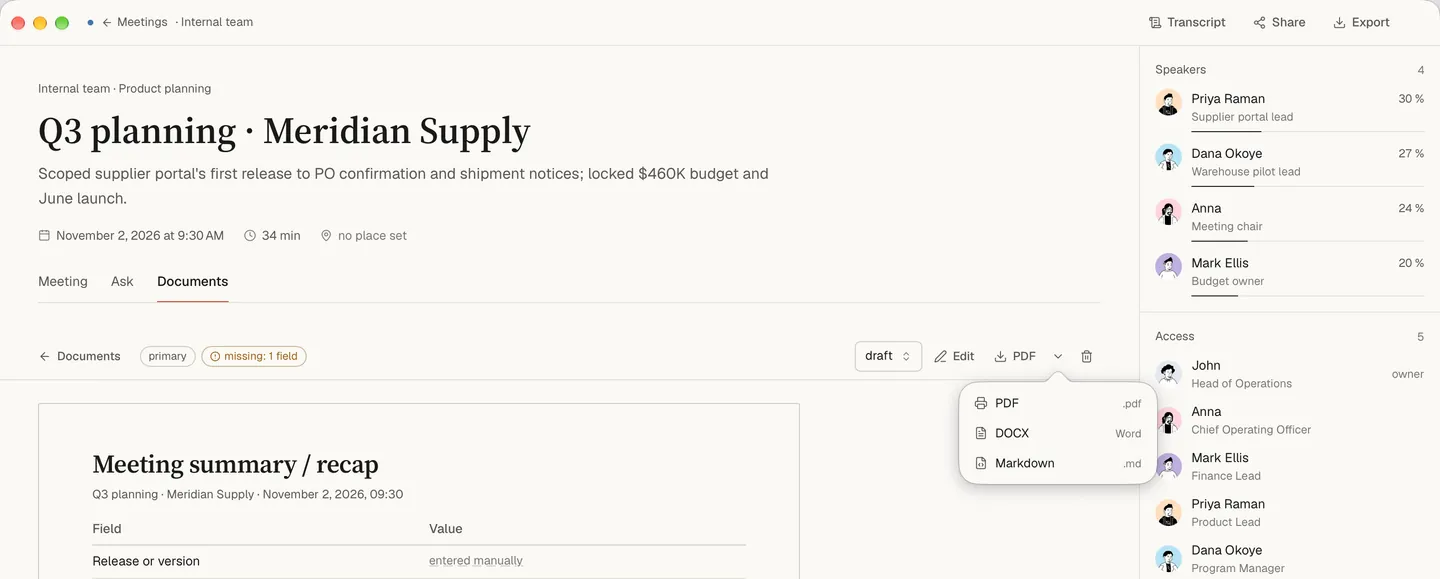
Getting a decision or a task into your tracker is a step you take, and Dalm makes it a short one. Any document from a meeting can be copied, saved as Markdown, Word or PDF, or sent through the macOS share menu, and the transcript can be saved as text. If your tickets follow a pattern, describe it once as a template — the tasks from each meeting in the shape you paste — and tick the box to build it for every new meeting. And when you write the ticket yourself, dictate it: hold the right ⌘, speak, let go, and the text types into whatever field has the cursor, in any app.
Telling the team and your customers that you record
Dalm does not join the call and tells no one it is recording, so saying so is up to you; before your first meeting, the app reminds you. For the team that can be one line when a series of meetings starts. Customers on a call are people outside your company, and they are owed the same sentence. If anyone asks what happens to their words, the answer is short: the audio stays on your Mac and is deleted and the text is synced to our servers and read by a third-party language model. The rules on recording consent differ by place.
When Dalm is not the right fit for a product manager
- When your company does not allow product plans to be kept by an outside service, even as text. The transcript is synced to our servers and read by a language model run by a third party.
- When you need to hear how something was said — a customer’s tone in a demo, a heated retro. The audio is deleted once the text exists, and there is nothing to play back.
- When tasks should appear in your tracker with nobody touching them. They leave Dalm as documents you copy, save or share.
- When you need to search every meeting your team recorded. Search covers your own meetings and the ones you were invited to; the rest you open from the Team list and read there.
- When you want the assistant to answer from a whole quarter of meetings at once. Today a question is asked about one meeting; across meetings, the Decisions log, the Tasks list and search are what works.
- When the team works on Windows or on an Intel Mac. Dalm needs a Mac with Apple Silicon · macOS 15.0 or later; anyone else reads what you send them.
- When most of your meetings are a two-minute check: a recording with fewer than 100 words is not counted as a meeting.
Free for one product manager, Team for a product team
Recording meetings, the transcripts and the summaries come with the Free plan, and Free is a plan rather than a trial. A product team can work in one team workspace: a shared dictionary keeps feature names, codenames and customers’ names spelled the same way in everyone’s transcripts, and templates and tags are shared too. Dictations are not shared inside a team — nobody else sees them, the owner included. Who sees whose meetings is on the team page; what the paid plans add is on the pricing page. Dalm needs a Mac with Apple Silicon · macOS 15.0 or later and an account; while it is not public, the way in is the waitlist.
Questions
- Does Dalm put a bot in our team's calls?
- No. It records your microphone and the sound of the other apps on your Mac, so nothing joins the call. When Zoom, Microsoft Teams, Slack or FaceTime starts using the microphone, it offers to record. It tells no one else that it is recording, so saying so is up to you.
- Can I find what we decided about a feature months ago?
- Yes, by searching. The Decisions log gathers what your meetings recorded as a decision, month by month, and searches by the decision's text and the meeting's name; meetings a colleague recorded and invited you to are included; the main search also looks through transcripts and documents. Questions to the assistant are asked about one meeting at a time; asking one question across all your records is in development.
- Can it tell a retro from a planning session?
- It works the kind of meeting out from the conversation and shows it at the top; you cannot pick or change it, and when it is unsure the meeting is filed as a general one. If you want the same write-up whatever the kind, describe it once as a template and tick the box to build it for each new meeting.
- How do tasks get from a meeting into our tracker?
- Through you, in a few steps: copy a document from the meeting, save it as Markdown, Word or PDF, or send it through the macOS share menu; a template can put the tasks in the shape your tickets use; and dictation types into any app, the tracker included. The connection Dalm makes itself is to a calendar, for the meetings you schedule.
- Where do my team's words end up?
- The speech is recognised on your Mac, and the audio is deleted once the text exists. The transcript is synced to our servers automatically and kept there while your account or the team workspace it belongs to exists, and a third-party language model reads it to write the summary.
- Will it know my engineers' voices next sprint?
- No. Voices are told apart inside one recording, and nothing about a voice carries over to the next one, on the same Mac too. Until you name a voice, it shows the app's guess or a number; in the naming step a guess may be marked "Suggested by Dalm — check before you agree.", and in the transcript and the summary it looks like any other name until you confirm or change it. Naming voices is optional.
- Is Dalm free for a product manager?
- There is a Free plan, and it is a plan rather than a trial: recording, the transcript and the summary are on it. Dalm needs a Mac with Apple Silicon · macOS 15.0 or later and an account, and while it is not public, the way in is the waitlist.